



















ZERO TRUST APPROACH

Why It Matters

Zero Trust = Always Verify

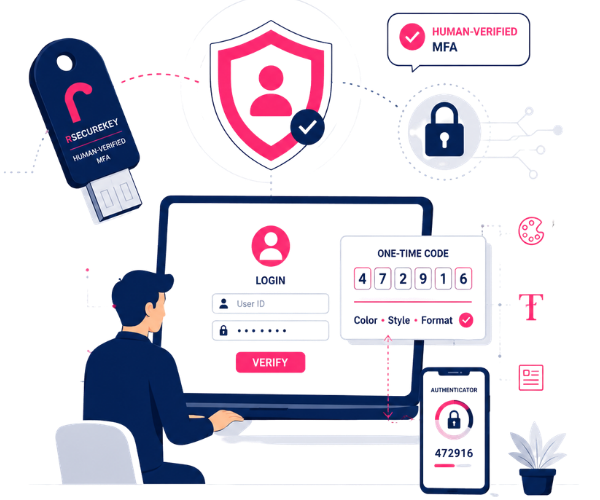
Access shouldn't be granted just because a password or code checks out. rSecureKey verifies the human behind the login, every time.

MFA Fatigue Is a Real Attack Vector

Simple Approve/Deny push prompts get rubber-stamped by tired or distracted users. rSecureKey's interactive step can't be approved by accident.

Passwords & OTPs Alone Aren't Enough

Passwords leak on the dark web and OTPs get phished daily. rSecureKey assumes both can be compromised — and protects the login anyway.

Compliance Risk Keeps Growing

Regulators and cyber-insurers increasingly expect phishing-resistant MFA. rSecureKey helps you get there without adding friction your team will resist.

SIMPLE FOR USERS

How rSecureKey Works

1
Enter Your ID
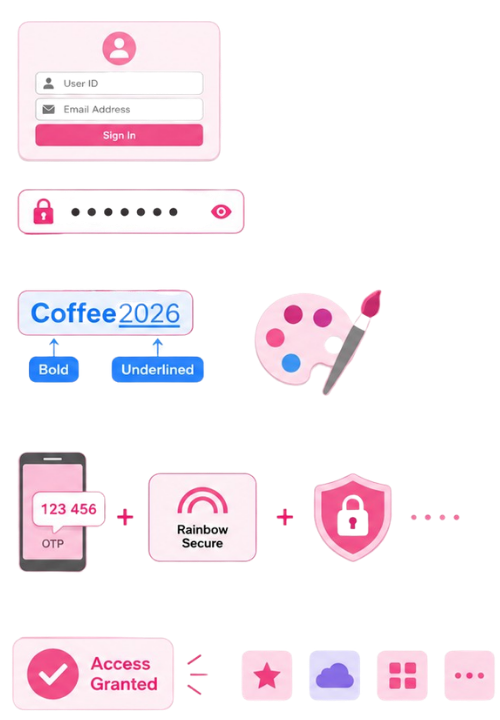
The user signs in with their user ID or email address, as usual.

2
Enter Your Password
The user types their password — the credential that, on its own, is never enough with rSecureKey.

3
Apply Your Color & Style Formatting
The user recreates their personal pattern from memory — for example, bold blue for one part of the password and underlined for another. Say a password is Coffee2026: the user might make “Coffee” bold and blue, and “2026” underlined. A leaked “Coffee2026” on its own still fails without that exact pattern.

4
Adaptive One-Time Password
OPTIONAL
Based on role, risk, app, or context, the user may then be prompted for a one-time password. This can be delivered by Rainbow Secure — dynamic instructions sent to trusted endpoints (device, email, or OTP, in a single or split manner) — or through Entra, Okta, or Google Authenticator, as the client’s security stack requires. Rainbow Secure’s dynamic instructions may also layer a color & style formatting challenge on top of the OTP or TOTP — so even the one-time code has to be solved, not just entered.

5
Verified Access Granted
Only when the password, the visual pattern, and any required OTP all match does rSecureKey confirm the human and grant access — via SSO to connected apps if enabled.
Capabilities

Key Features

Rainbow Secure Technology — patented color, style, and formatting-position based authentication.

Adaptive OTP by role, risk, app, or context — via Rainbow Secure (device, email, single or split), Entra, Okta, or Google Authenticator.

Interactive, not a rubber stamp — can't be approved by accident like push MFA.

No extra app or hardware token required.

Works uniformly across browsers, mobile, Chromebook, Windows, and Mac.

Adaptive, risk-based challenges — adjusts based on device, time, and location.

Device fingerprinting and geo-fencing for location-based access rules.

Self-service enrollment and password management to reduce help-desk load.

Deep branding control so the login screen looks and feels like your organization.

Developer-friendly Rainbow Secure MFA Verification API for custom integrations.

ALWAYS ON

24/7 Threat Protection

Threat How rSecureKey Protects
Credential theft & dark-web leaks Patented color/style formatting means plain text alone is insufficient — attackers need the exact font, size, color, and style the user applies.
Phishing & look-alike login pages Fake portals can’t reproduce Rainbow Secure’s unique color/style UI, giving users a built-in visual cue that something’s wrong.
Brute force & credential stuffing Adding even one formatting choice raises guessable combinations from billions to quadrillions, well beyond automated guessing.
Keyloggers & screen-scraping malware Keyloggers capture typed characters, not colors or styles — so a captured password or OTP still fails the visual step.
MFA fatigue & prompt-bombing No simple Approve/Deny push to rubber-stamp — the interactive color/style step can’t be approved by accident.
SIM-swapping & OTP interception Never relies on SMS as the only factor — the visual layer still has to be cleared even if an OTP is intercepted.
Man-in-the-middle & replay attacks Each session’s visual challenge is generated fresh, so a captured login attempt can’t simply be replayed.
AI-powered automated attacks Bots that clear CAPTCHAs still can’t predict a user’s personal, patented visual pattern.
PRICING

Simple, modular pricing

$3 per user / month
rSecureKey starts at $3 per user, per month, as part of Rainbow Secure’s modular platform — add IAM, SSO, Team Access, or Digital Vault only as you need them.

Organizations That Trust Rainbow Secure

IN THEIR WORDS

Testimonials

BUILT FOR YOUR SECTOR

Industry Solutions

image Healthcare

Protect patient and business systems when credentials are compromised, while supporting HIPAA-relevant audit evidence.

image Government

Strengthen identity assurance for employees, contractors, and privileged users without slowing down authorized work.

image Education

Protect staff and student access with a login that's easy to remember and hard for attackers to reuse.

image Finance & Fintech

Add a phishing-resistant verification layer to high-value transactions and privileged financial systems access.

image MSP / MSSP

Deliver managed identity protection that goes beyond commodity password and OTP controls.
STANDARDS

Compliance & Standards

rSecureKey supports access-control and audit-evidence needs relevant to:
HIPAA
FERPA
GDPR
CCPA
SOC 2
NIST 800-63
AES-256
TLS 1.3
rSecureKey supports and helps evidence these standards; it does not guarantee compliance.
RECOGNITION

Awards

THE DIFFERENCE

We're Different From Others

Verifies the human, not just the credential

Rainbow Secure Technology adds a patented color/style/position layer, so a correct password or code alone isn't enough.

Can't be rubber-stamped like push MFA

The interactive visual challenge takes real attention, closing the door on MFA-fatigue attacks.

Built to lower help-desk load

Easy-to-remember visual patterns are designed to cut password-reset tickets, not add friction.

No app or hardware token required

Works with OTP over email, SMS, or app, plus the visual step — no extra device to carry or lose.

One platform, not a point solution

rSecureKey is the flagship of a full identity platform — IAM, SSO, adaptive access, Team Access, Digital Vault.

QUESTIONS
Frequently Asked Questions

  • What is rSecureKey?

    rSecureKey is Rainbow Secure's flagship Human-Verified MFA product. It's built on Rainbow Secure Technology, a patented method that adds a color, style, and formatting-position layer on top of your password or one-time code.

  • How is this different from regular MFA?

    Most MFA verifies a code or a push tap — not the person behind it. rSecureKey adds an interactive step based on a visual pattern only the authorized user knows, so a stolen password or intercepted OTP alone isn't enough to log in.

  • Do users need to install an app or carry a hardware token?

    No hardware token is required. The core step is the visual color/style formatting layer. A one-time password is applied adaptively — only when role, risk, app, or context calls for it — and can be delivered by Rainbow Secure (dynamic instructions to trusted endpoints such as the device or email, in a single or split manner) or through your existing Entra, Okta, or Google Authenticator setup. Where warranted, Rainbow Secure's dynamic instructions can also require a formatting challenge to be solved on top of the OTP or TOTP itself.

  • Is this hard for employees or customers to learn?

    The pattern is something the user chooses and remembers, similar to picking a memorable password — most users pick it up quickly, and it's designed to reduce help-desk password-reset volume over time.

  • Does rSecureKey work on mobile devices?

    Yes. It works consistently across browsers, operating systems, mobile, Chromebook, Windows, and Mac.

  • Can rSecureKey integrate with our existing applications?

    Yes. The Rainbow Secure MFA Verification API lets developers embed OTP and formatting-challenge verification directly into existing applications and websites.

  • Does rSecureKey support compliance requirements?

    rSecureKey supports access-control and audit-evidence needs relevant to HIPAA, FERPA, GDPR, CCPA, SOC 2, and NIST 800-63 guidelines. Specific control mapping is available on request.

  • What does rSecureKey cost?

    rSecureKey starts at $3 per user, per month, as part of Rainbow Secure's modular, per-feature pricing. See the Pricing page for the full platform breakdown and volume options.

RESOURCES

Latest from the Blog

Insights on Human-Verified MFA, Zero Trust, and defending logins against modern attacks.

Your Biggest Security Risk May Already Be Inside Your Company

Your Biggest Security Risk May Already Be Inside Your Company

The most dangerous identity in your organization may not belong to an attacker. It may belong to an administrator.Organizations spend millions detecting external threats.But here’s an…

Read More →
MFA Is Not the Finish Line: Why Identity Security Must Move Beyond the Login

MFA Is Not the Finish Line: Why Identity Security Must Move Beyond the Login

For years, organizations have treated authentication as a security checkpoint:Enter your password → complete MFA → get access.But the threat landscape has changed.Today, attackers don’t necessarily need…

Read More →
The SafePal Breach: When an Order-Tracking Flaw Becomes an Identity Security Crisis

The SafePal Breach: When an Order-Tracking Flaw Becomes an Identity Security Crisis

What a crypto hardware-wallet data breach teaches every CISO about authorization, identity, and the danger of “non-critical” dataA cybersecurity incident does not always begin with…

Read More →

Ready to Get Started? We're Here to Help

Verify the human behind every login. Book a walkthrough of rSecureKey and see Human-Verified MFA in action.

Let’s Talk