
Why It Matters

Image

In the event of:
  • Account compromise
  • Insider misuse
  • Suspicious privilege escalation
  • Unauthorized configuration changes
  • Regulatory audit requests
Organizations must produce reliable, time-stamped evidence.
Without centralized identity logging:
  • NIST SP 800-82 (ICS Security)
  • Evidence is fragmented
  • Audit findings increase
  • Legal exposure escalates
Attackers exploit blind spots. Governance fails without visibility. Identity systems must deliver forensic-grade transparency — not just authentication.

What is The Digital Vault?


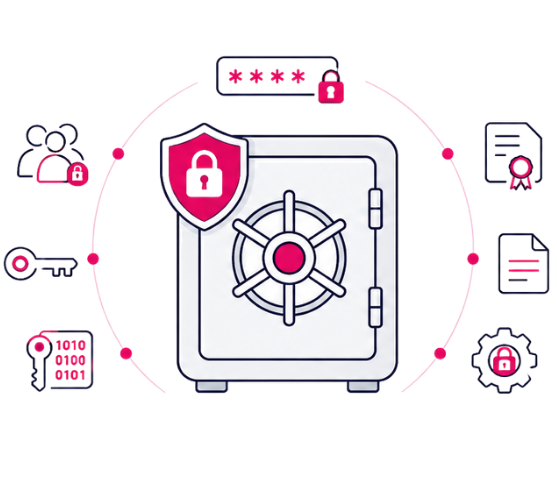
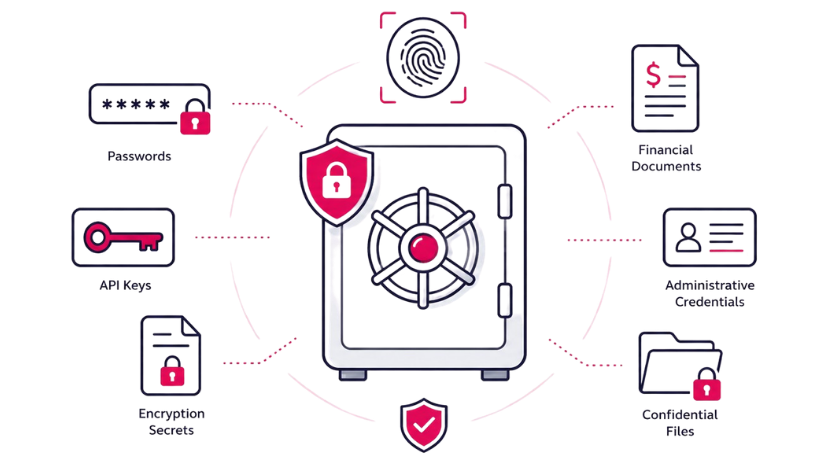
The Rainbow Secure Digital Vault is a secure, encrypted storage environment designed for:
  • Passwords
  • Shared credentials
  • API keys
  • Encryption keys
  • Certificates
  • Sensitive documents
  • Administrative secrets
Access to vault items is controlled through:
  • Role-Based Access Control (RBAC)
  • Strong MFA enforcement
  • Cognitive authentication using approved color, font, and formatting rules
  • Continuous Trust validation
  • Audit logging
Secrets are encrypted at rest and protected in transit, Access is never anonymous, Every interaction is authenticated, validated, and traceable.

Image

Core Functional Components

  • Encrypted Secret Storage


    All secrets and files are encrypted using strong cryptographic standards.
    Sensitive data remains protected even if underlying infrastructure is targeted.

  • Role-Based Access Enforcement

    default access is restricted based on:

    1. User role
    2. Department
    3. Sensitivity level
    4. Approval workflows
    Users can access only what policy explicitly permits.

  • Cognitive Authentication Before Access

    Before vault items are accessed:
    1. MFA is enforced
    2. Device trust is evaluated
    3. Risk signals are reviewed
    4. Color, font, and formatting validation must comply with organizational Visual DNA™
    Plain password text is meaningless without correct visual and policy validation.

  • Detailed Audit Logging

    All actions are logged, including:
    1. Secret creation
    2. Secret access
    3. File downloads
    4. Modifications
    5. Deletions
    Full visibility supports compliance, investigations, and governance.

  • Controlled Sharing & Access Expiration

    Administrators can:
    1. Grant temporary access
    2. Set expiration policies
    3. Revoke access instantly
    4. Restrict download permissions
    Access remains continuously governed.

Feature Blocks

Centralized Secret Management

Store credentials and sensitive files in one encrypted, identity-bound environment. Eliminate unsecured storage methods.

Visual-DNA Protected Vault Access

Vault access requires structured authentication aligned with your organization’s approved color, font, and formatting policy. Even if a password is exposed elsewhere, vault access fails without correct visual validation.

Granular Permission Control

Administrators can:
  • View access
  • Edit permissions
  • Download rights
  • Time-based access
Sensitive information remains policy-restricted.
Audit-Ready Activity Tracking

Generate logs showing:
  • Who accessed which secret
  • When it was accessed
  • From which device
  • Under which authentication conditions
Supports regulatory compliance  and forensic review.
Temporary & Role-Based Secret Access

Secrets can be shared:
  • Based on role
  • For limited time
  • For defined projects
No standing exposure. No uncontrolled sharing.

Benefits

Reduce Secret Sprawl

Eliminate insecure password storage practices.

Protect Against Credential Theft

Encryption combined with cognitive authentication reduces breach risk.

Increase Accountability

Every vault interaction is logged and attributable to a verified identity.

Improve Compliance Posture

Supports governance standards requiring secure credential storage and traceable access.

Enable Zero-Trust Secret Access

Access to secrets requires continuous validation — not static trust.

Shape Image

Blog & Technical Resources


Digital Vault Security Guides
Rainbow Secure provides practical and technical guidance, including:
  • Best practices for secure secret storage
  • Replacing spreadsheet password management with encrypted vaults
  • Protecting API keys in enterprise environments
  • Implementing Zero-Trust secret access
  • Securing shared administrative credentials
Each guide includes:
  • Architecture explanations
  • Encryption best practices
  • Governance models
  • Compliance alignment strategies

Image

Frequently Asked Questions

Image

Pricing & Editions


Digital Vault
Available as:
  • Digital Vault packages
  • Integrated with MFA, RBAC, Lifecycle & Continuous Trust
Pricing depends on:
  • Number of users
  • Volume of stored secrets

Request Security Consultation

Image
Image

Are You Ready For The Action?


Your Secrets Should Not Live in Spreadsheets.
With Rainbow Secure Digital Vault:
  • Secrets are encrypted
  • Access requires visual and cognitive validation
  • Actions are logged
  • Risk is minimized
Protect your most sensitive information with confidence..

How to Add a Password-Protected Word File to Rainbow Secure Digital Vault

Protect your sensitive Word documents easily with Rainbow Secure Digital Vault. Upload your file, set a password, add security details, and store it securely in just a few steps.
1. Upload Your Word File
Click “Add Secret,” enter a name, and upload your Word document. Once uploaded, you’ll see options to secure and organize the file.
2. Set a Password
Click the pencil icon next to “Secret Password” and create your password. Enable “Apply Password” to keep protection active when the file is downloaded or opened locally.
3. Add File Details
Add a description, category, and security label such as Confidential to keep your documents organized and easy to identify.
4. Save Securely
Review your details and click “Submit.” Your protected Word file will appear in the Digital Vault’s secret grid.
FROM THE BLOG

Go deeper on identity security

Insights on moving beyond passwords and building phishing-resistant identity.
Your Biggest Security Risk May Already Be Inside Your Company

Your Biggest Security Risk May Already Be Inside Your Company

The most dangerous identity in your organization may not belong to an attacker. It may belong to an administrator.Organizations spend millions detecting external threats.But here’s an…

Read More →
MFA Is Not the Finish Line: Why Identity Security Must Move Beyond the Login

MFA Is Not the Finish Line: Why Identity Security Must Move Beyond the Login

For years, organizations have treated authentication as a security checkpoint:Enter your password → complete MFA → get access.But the threat landscape has changed.Today, attackers don’t necessarily need…

Read More →
The SafePal Breach: When an Order-Tracking Flaw Becomes an Identity Security Crisis

The SafePal Breach: When an Order-Tracking Flaw Becomes an Identity Security Crisis

What a crypto hardware-wallet data breach teaches every CISO about authorization, identity, and the danger of “non-critical” dataA cybersecurity incident does not always begin with…

Read More →

Ready To Get Started ? We're Here To Help

Start your journey with us today. It’s quick, easy, and we’re here to help you every step of the way.
Let’s Talk