
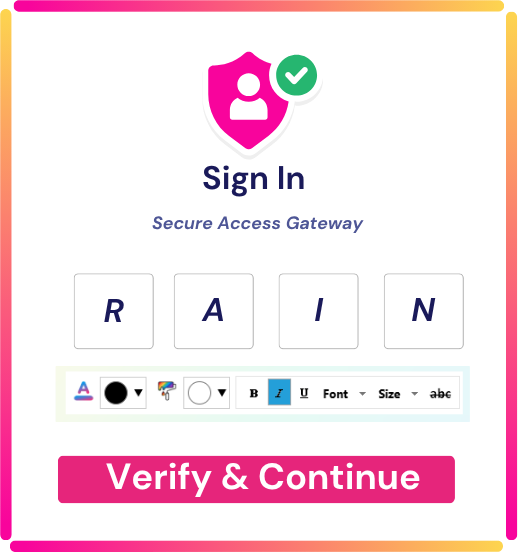



Step 1 — Enter Your rSecureKey
Users enter their secure key and apply their defined color/style pattern. If the formatting or pattern fails validation, the authentication attempt stops immediately.
Step 2 — Enter Your OTP
A one-time code is delivered via email or SMS, or split across both channels for distributed verification. User enters the code as received.
Alternatively, users may be challenged via the source IDP’s Authenticator app (Microsoft Authenticator, Google Authenticator) or Rainbow Secure TOTP Authentication
Step 3 — (Optional) Apply Color and Style Formatting
If configured, users apply the instructed color, font, or style formatting to the OTP—adding an additional cognitive verification layer that automation cannot execute.
Step 4 — Centralized Server Validates Identity
Rainbow Secure’s centralized authentication server processes the submitted formatted OTP, verifying credentials, visual formatting patterns, device context, and risk signals before granting access exclusively to the authenticated human user.


Continuous Risk Checks (Zero Trust Enforcement)
- Bot behavior
- Unusual location
- Impossible travel
- Repeated OTP failures
- Suspicious devices

Your Biggest Security Risk May Already Be Inside Your Company
The most dangerous identity in your organization may not belong to an attacker. It may belong to an administrator.Organizations spend millions detecting external threats.But here’s an…
Read More →
MFA Is Not the Finish Line: Why Identity Security Must Move Beyond the Login
For years, organizations have treated authentication as a security checkpoint:Enter your password → complete MFA → get access.But the threat landscape has changed.Today, attackers don’t necessarily need…
Read More →
The SafePal Breach: When an Order-Tracking Flaw Becomes an Identity Security Crisis
What a crypto hardware-wallet data breach teaches every CISO about authorization, identity, and the danger of “non-critical” dataA cybersecurity incident does not always begin with…
Read More →